

What you'll get
You turn any document — photo, scan, handwritten note, table, even formulas — into clean Markdown (and LaTeX for equations) in a few seconds, right inside your workflow. By the end of this guide you'll know:
- Clean text and tables in Markdown, ready to paste wherever you need them.
- The certainty of knowing where the model is unsure (confidence score) and where to double-check.
- The right way to integrate it: the chat, an automation or a few lines of code.
- A starting point without installing anything: 9 free tries on our tool.
Try it now, before you choose
Before deciding how to integrate it, test it in 30 seconds on our tool: no account, no payment. In about 0.4 seconds you get clean markdown. You get 9 free tries.
Try it now on the AI Pratika tool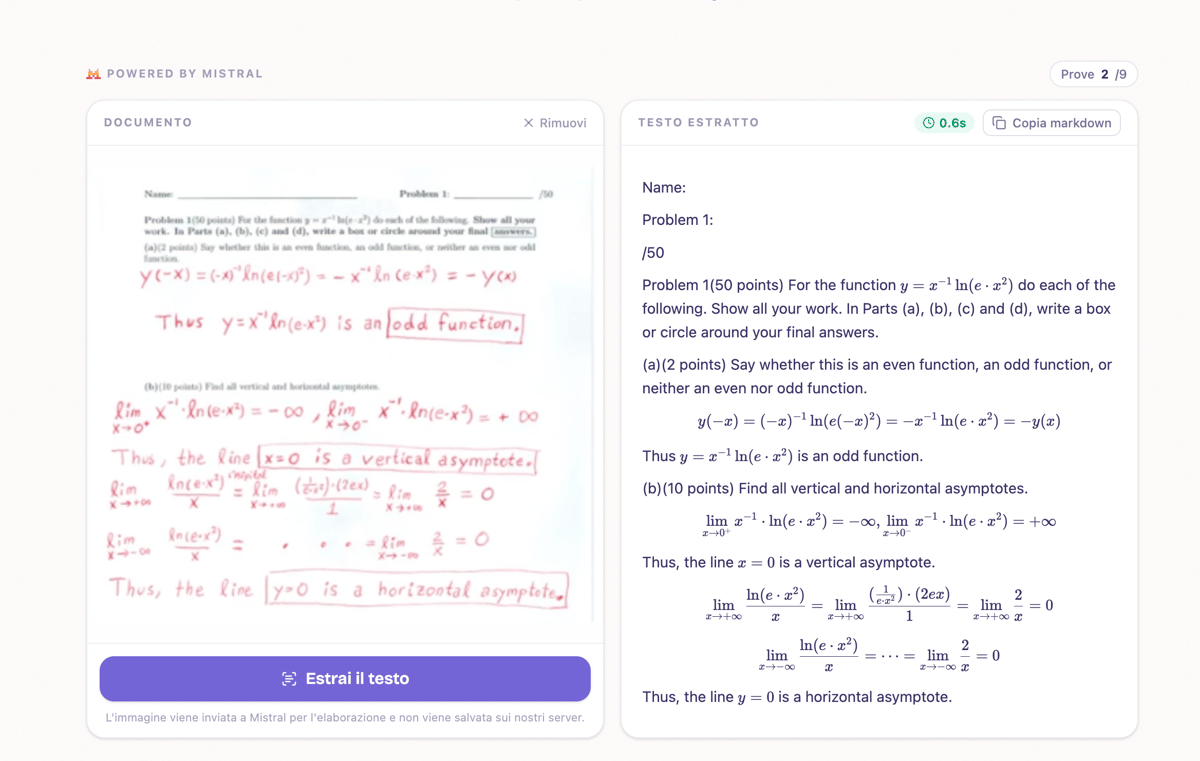
- 1 Upload the image (photo, scan, screenshot — even crooked is fine).
- 2 Click "Extract text".
- 3 Click "Copy markdown" and paste it wherever you need it.
For people who don't code
Mistral's chat
When our tool's 9 tries aren't enough, Mistral's chat is home for people who don't code: you upload a document and ask for the extraction, in plain English. Three steps.
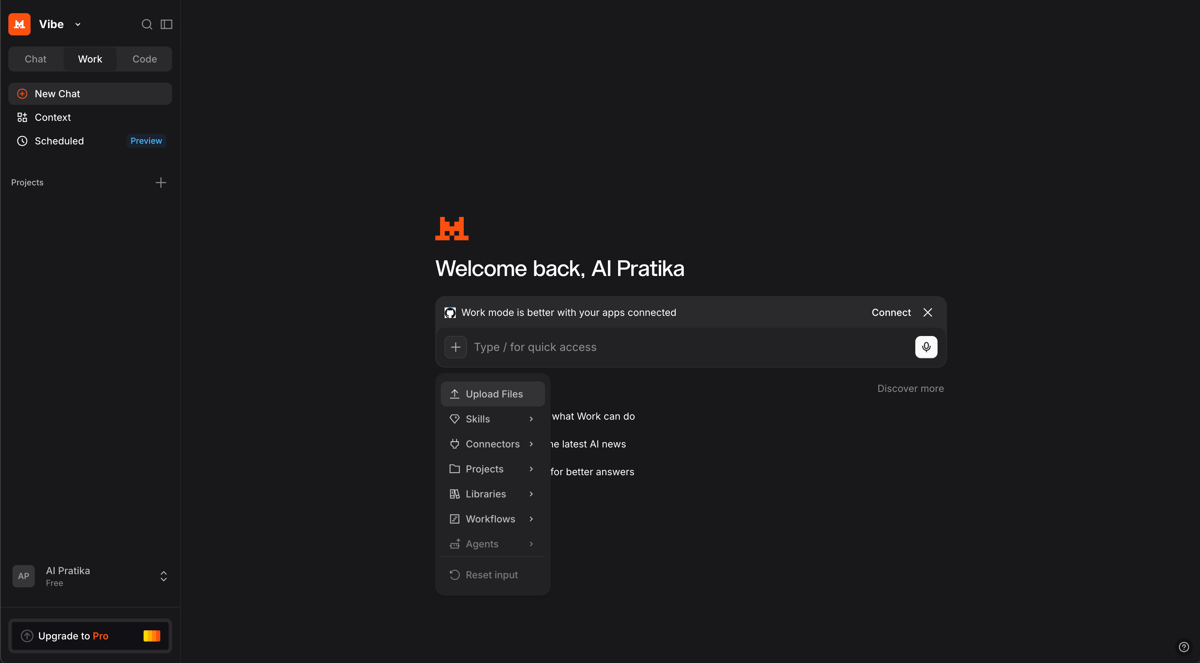
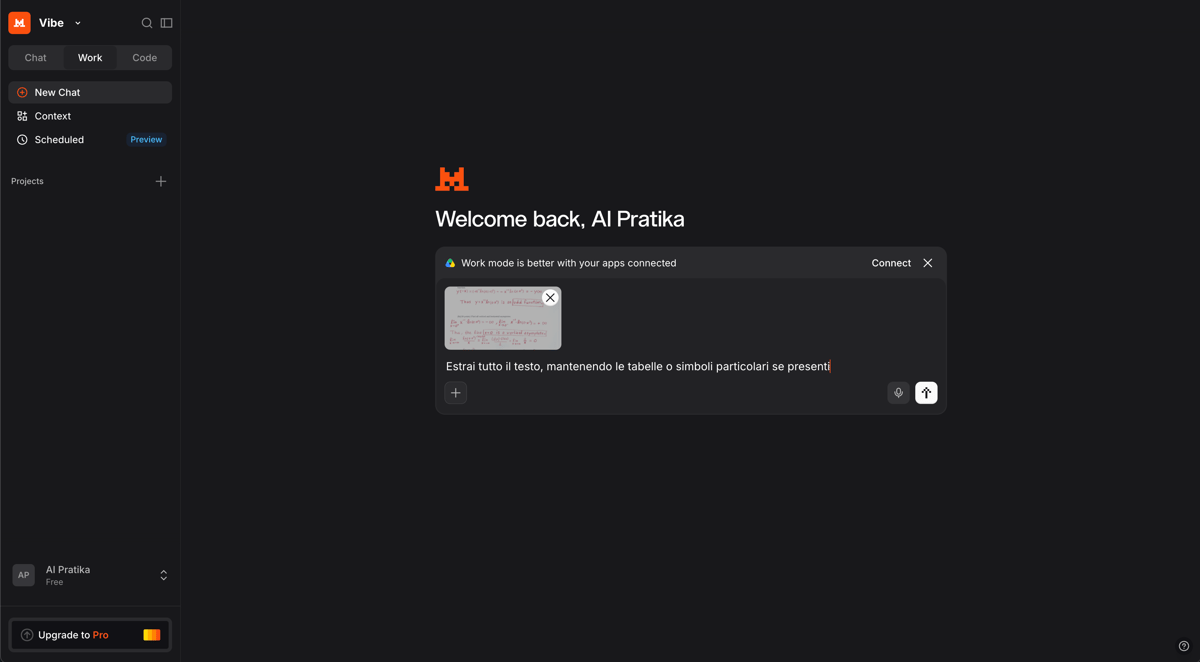
Extract all the text, keeping tables or special symbols if present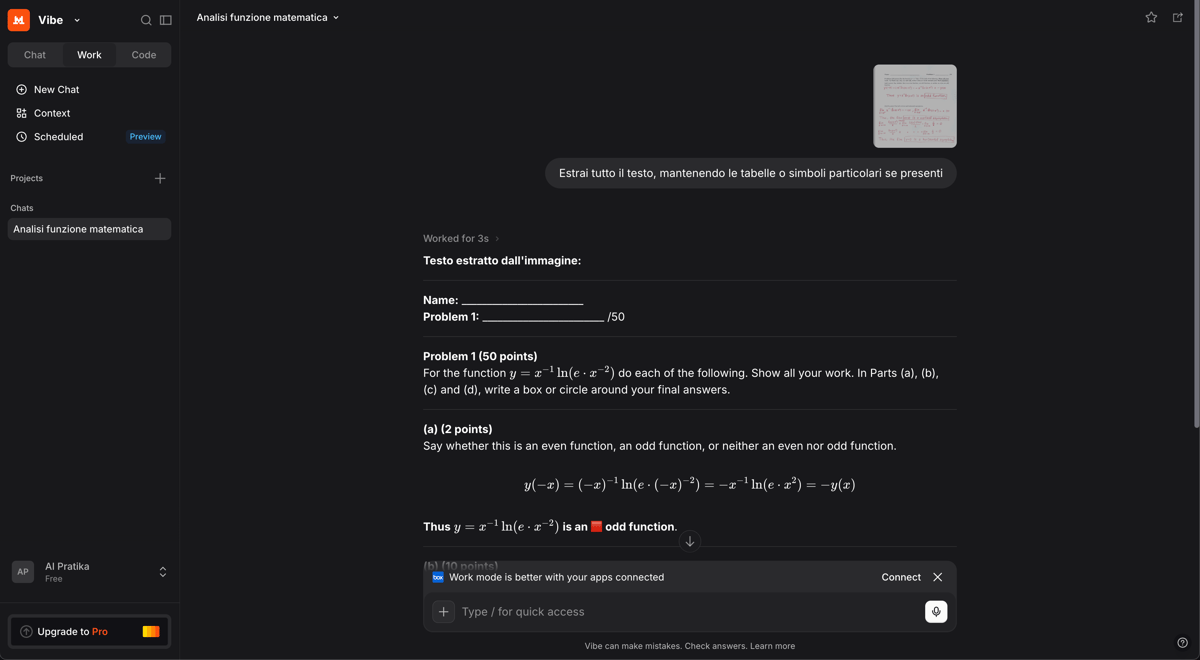
For those who want to automate
Automation with n8n
Do you need to process lots of similar files? A ready-made n8n template connects Mistral OCR to your flow. It's not one-click: you import it, add your key and adapt it.
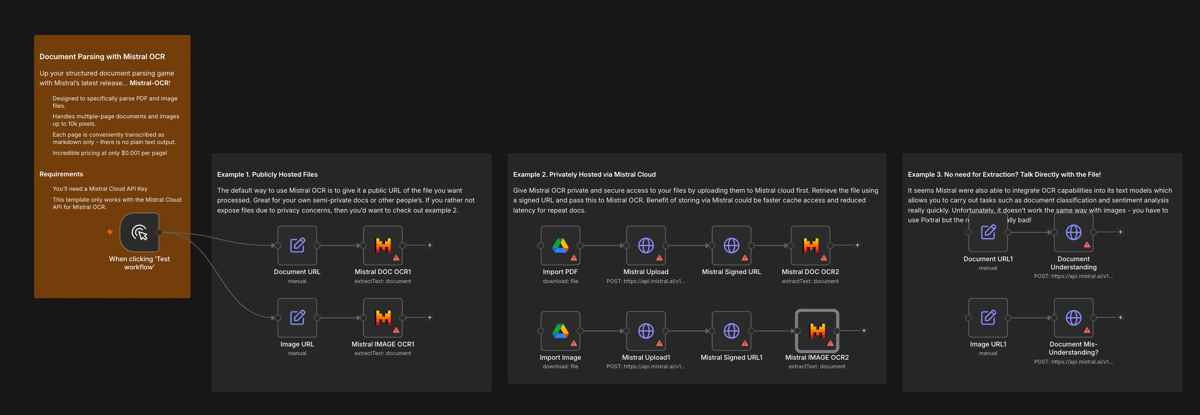
It's a community template: always check what it does before running it. Just like on our tool, the file gets sent to Mistral for processing.
For developers
In your code (JS/TS)
It's the same approach that runs in our tool: a single fetch call, zero dependencies. It runs server-side — the key must never reach the browser. The image is passed inline as a base64 data URI.
// SERVER-SIDE — la chiave Mistral non arriva mai al browser
export async function estraiTesto(imageDataUrl) {
  const res = await fetch("https://api.mistral.ai/v1/ocr", {
    method: "POST",
    headers: {
      "Content-Type": "application/json",
      Authorization: `Bearer ${process.env.MISTRAL_API_KEY}`,
    },
    body: JSON.stringify({
      model: "mistral-ocr-latest",
      document: { type: "image_url", image_url: imageDataUrl },
      include_image_base64: false,
      image_limit: 1,
    }),
  });
  if (!res.ok) throw new Error(`Mistral OCR ${res.status}`);
  const data = await res.json();
  return data.pages?.[0]?.markdown ?? "";
}
imageDataUrl is a data:image/…;base64,… string. The returned Markdown can contain HTML: sanitize it before displaying it. API reference: docs.mistral.ai.
Why it's not your usual OCR
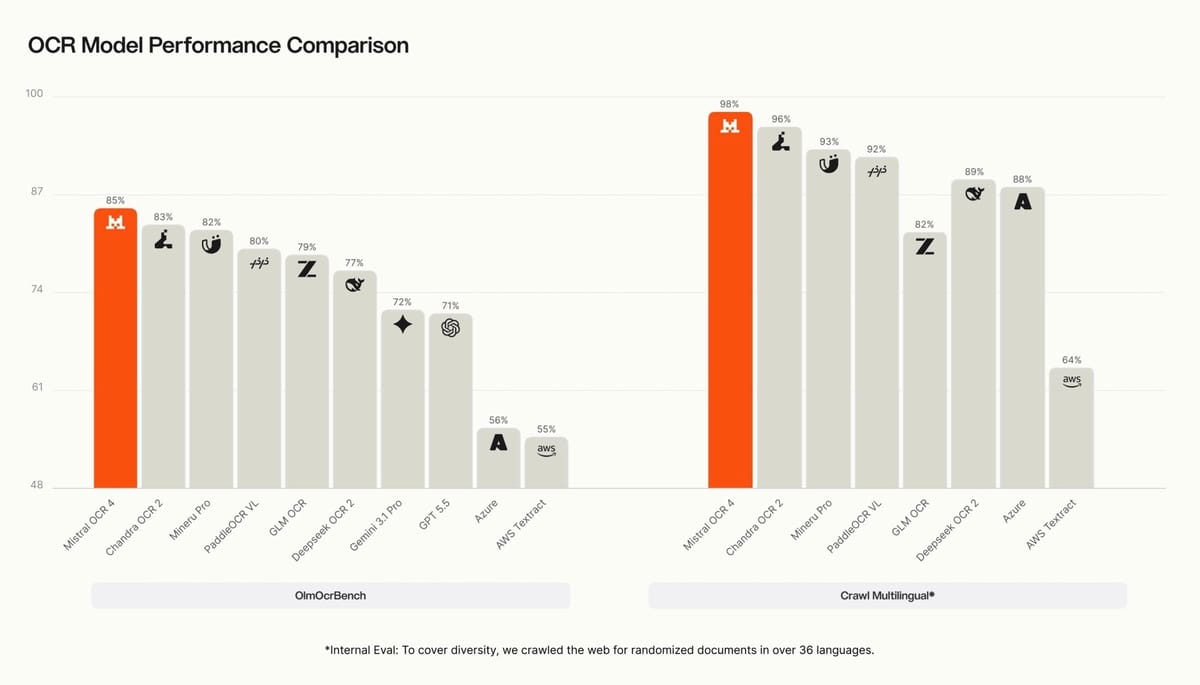
Classic OCR "sees" characters. Mistral OCR 4 understands the document: it classifies the blocks — headings, table cells, equations, signatures, charts — and for each region returns coordinates, block type and a confidence score that tells you where the model is unsure.
The numbers back it up: independent annotators evaluated over 600 documents in more than 12 languages, preferring OCR 4 with a 72% win rate; it scores 85.20 on OlmOCRBench and covers 170 languages, including Italian.
Common mistakes to avoid
Mistral OCR isn't magic: it's an accelerator. You choose the path, it reads the document — the final judgment call stays yours.


'%3e%3c/path%3e%3cpath%20d='M20.616%2010.835a14.147%2014.147%200%2001-4.45-3.001%2014.111%2014.111%200%2001-3.678-6.452.503.503%200%2000-.975%200%2014.134%2014.134%200%2001-3.679%206.452%2014.155%2014.155%200%2001-4.45%203.001c-.65.28-1.318.505-2.002.678a.502.502%200%20000%20.975c.684.172%201.35.397%202.002.677a14.147%2014.147%200%20014.45%203.001%2014.112%2014.112%200%20013.679%206.453.502.502%200%2000.975%200c.172-.685.397-1.351.677-2.003a14.145%2014.145%200%20013.001-4.45%2014.113%2014.113%200%20016.453-3.678.503.503%200%20000-.975%2013.245%2013.245%200%2001-2.003-.678z'%20fill='url(%23lobe-icons-gemini-1-_R_0_)'%3e%3c/path%3e%3cpath%20d='M20.616%2010.835a14.147%2014.147%200%2001-4.45-3.001%2014.111%2014.111%200%2001-3.678-6.452.503.503%200%2000-.975%200%2014.134%2014.134%200%2001-3.679%206.452%2014.155%2014.155%200%2001-4.45%203.001c-.65.28-1.318.505-2.002.678a.502.502%200%20000%20.975c.684.172%201.35.397%202.002.677a14.147%2014.147%200%20014.45%203.001%2014.112%2014.112%200%20013.679%206.453.502.502%200%2000.975%200c.172-.685.397-1.351.677-2.003a14.145%2014.145%200%20013.001-4.45%2014.113%2014.113%200%20016.453-3.678.503.503%200%20000-.975%2013.245%2013.245%200%2001-2.003-.678z'%20fill='url(%23lobe-icons-gemini-2-_R_0_)'%3e%3c/path%3e%3cdefs%3e%3clinearGradient%20gradientUnits='userSpaceOnUse'%20id='lobe-icons-gemini-0-_R_0_'%20x1='7'%20x2='11'%20y1='15.5'%20y2='12'%3e%3cstop%20stop-color='%2308B962'%3e%3c/stop%3e%3cstop%20offset='1'%20stop-color='%2308B962'%20stop-opacity='0'%3e%3c/stop%3e%3c/linearGradient%3e%3clinearGradient%20gradientUnits='userSpaceOnUse'%20id='lobe-icons-gemini-1-_R_0_'%20x1='8'%20x2='11.5'%20y1='5.5'%20y2='11'%3e%3cstop%20stop-color='%23F94543'%3e%3c/stop%3e%3cstop%20offset='1'%20stop-color='%23F94543'%20stop-opacity='0'%3e%3c/stop%3e%3c/linearGradient%3e%3clinearGradient%20gradientUnits='userSpaceOnUse'%20id='lobe-icons-gemini-2-_R_0_'%20x1='3.5'%20x2='17.5'%20y1='13.5'%20y2='12'%3e%3cstop%20stop-color='%23FABC12'%3e%3c/stop%3e%3cstop%20offset='.46'%20stop-color='%23FABC12'%20stop-opacity='0'%3e%3c/stop%3e%3c/linearGradient%3e%3c/defs%3e%3c/svg%3e)