


What a routine is, in one sentence
A tool waits for you to hit enter. A coworker doesn't: it knows what to do and does it. Routines are what shifts Claude from the first category to the second — a saved instruction plus a trigger.
Describe what it should do and when, and from there it runs on its own, on Anthropic's cloud infrastructure. As the docs put it: it keeps running even when your computer is off.
The feature launched in April 2026 in research preview for the Pro, Max, Team, and Enterprise plans. It's young and can change: treat it as a work in progress, not a finished feature.
The core: the three questions
Behind every routine that works are three decisions. Answer these three questions and you've already done half the work.
- 1
Trigger: when should it start?
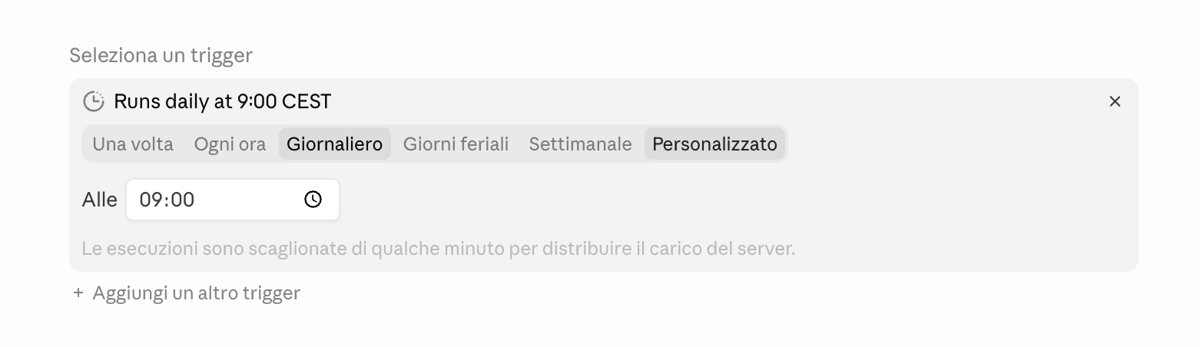
A fixed time ("every weekday morning at 8:00"), a cadence ("every Friday at 5pm"), or an event. It's the spark: without a when, the routine doesn't exist.
- 2
Context: what does it need to succeed?
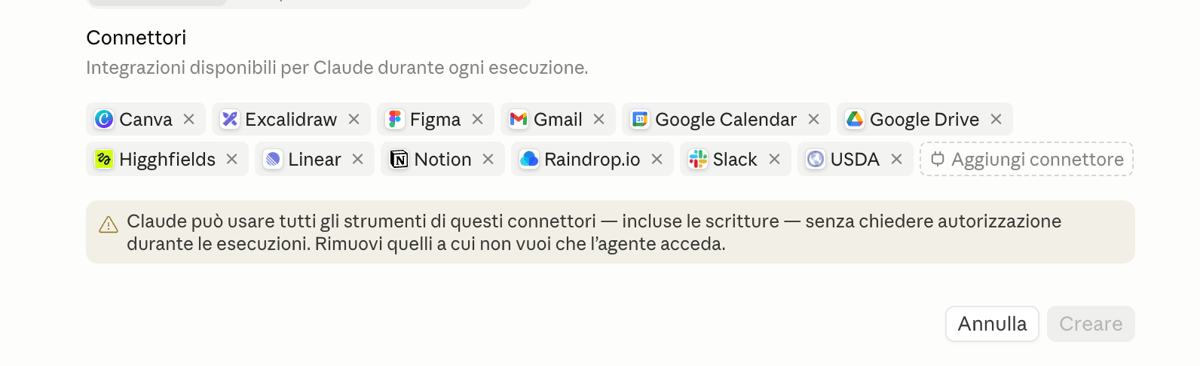
Connectors give Claude access to Gmail, Calendar, Drive, Notion, Slack. The rule is brutal: what Claude can't see, it can't use. Before saving, ask yourself what it needs to read and where it needs to write.
- 3
Control: how do you keep it honest?
Every run is a real Claude session: you can open it, watch it, correct it midway, and resume. The first few days you check everything; as trust builds, you widen its autonomy. If you can't describe what "done well" means, it isn't ready to be automated.
Watch out with connectors: during runs Claude uses every tool you've given it — writes included — without asking permission each time. Only grant the ones you trust for autonomous action.
A complete example, start to finish
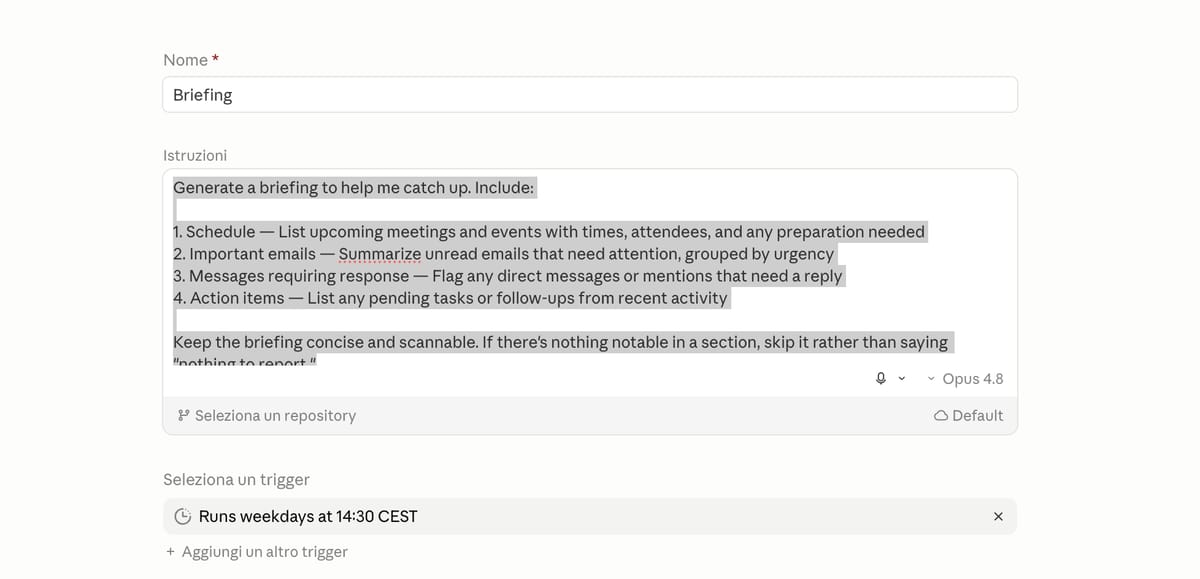
Every morning I lose twenty minutes checking my calendar, email, and messages to see how the day is shaping up. I turn it into a routine by applying the three questions.
- 1 When: every weekday morning at 8:00.
- 2 What it needs: access to Google Calendar, Gmail and Slack.
- 3 How I check it: the first few days I read what it summarized and make sure it didn't miss anything important.
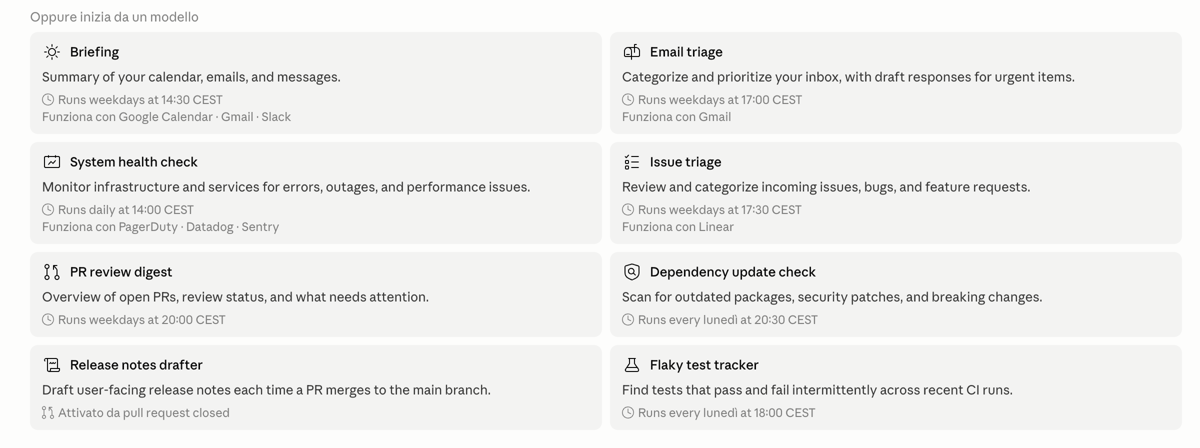
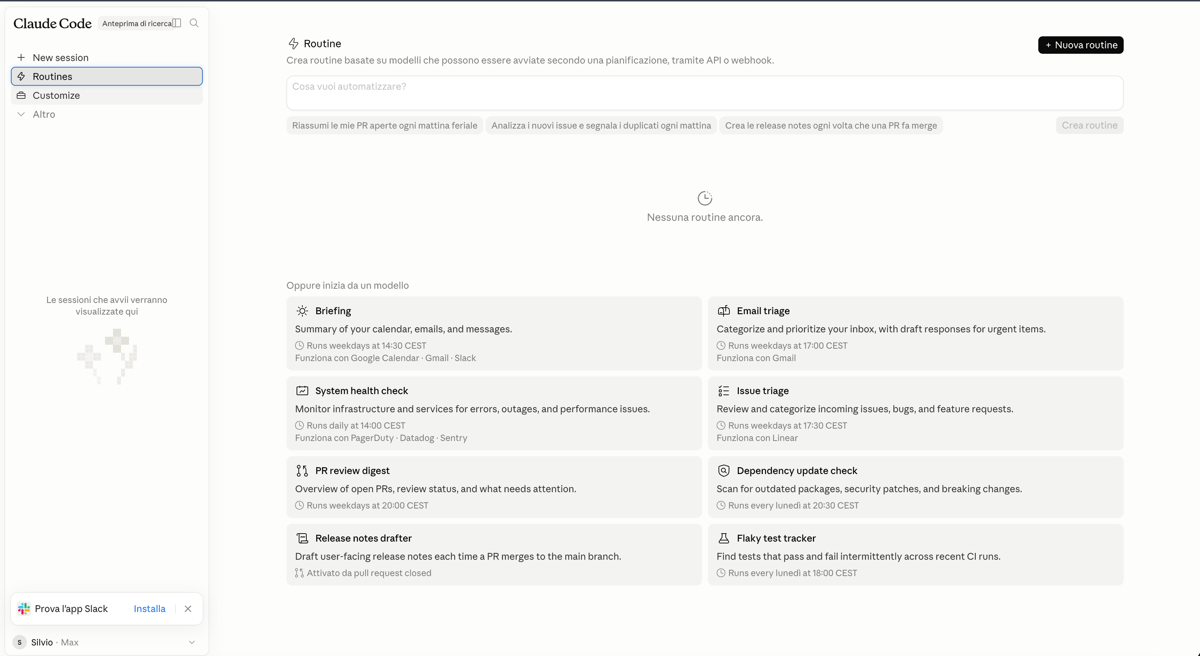
In practice: I open the Routines page, pick the Briefing template — built exactly for this — check the time and connectors, save. At 8am I find a briefing already waiting: agenda, urgent emails, relevant messages. Twenty minutes a day that come back to me. And the same pattern works for the Friday email roundup, meeting notes, and documentation updates.

Where it happens (and the three ways to build one)
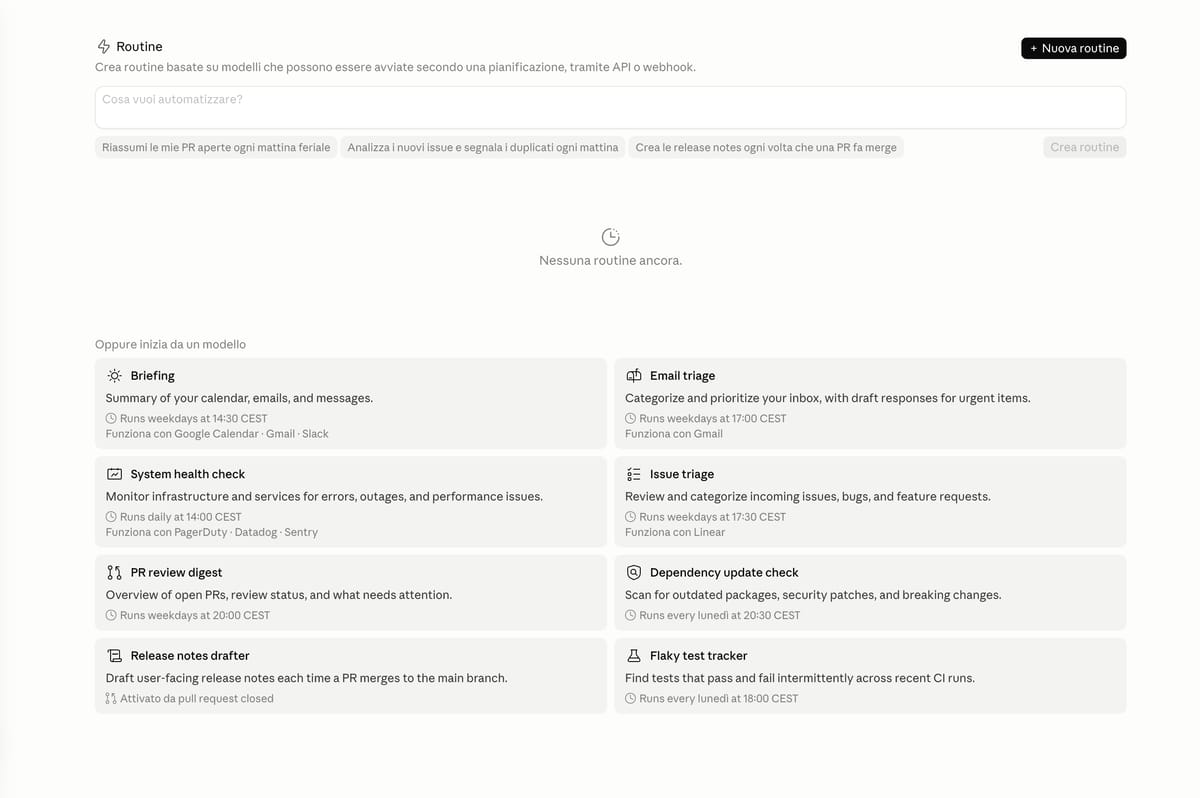
The starting point is the page claude.ai/code/routines. From there you have three paths, from the simplest to the most technical.
- 1
From a template
Ready-made options like Briefing or Email triage: pick one, check the time and connectors, save. Minimal setup, you're running in a minute.
- 2
In plain language
Describe in plain English what you want to automate. Claude builds the routine and asks you the right questions to fill in the gaps. The most natural route.
- 3
From scratch
You configure the name, instructions, trigger, and connectors by hand. It's the most powerful and the most intimidating: use it when you know exactly what you want.
For the trigger, choose between Once, Hourly, Daily, Weekdays, Weekly or Custom; for the context, connect Gmail, Calendar, Slack, Notion, Drive and the other available connectors. If you're starting from scratch, there's one piece of advice: start with a template and branch out from there.
Now it's your turn
The point isn't to automate everything: it's to take back the time you spend on things a machine can do for you — keeping the decisions that matter for yourself.


'%3e%3c/path%3e%3cpath%20d='M20.616%2010.835a14.147%2014.147%200%2001-4.45-3.001%2014.111%2014.111%200%2001-3.678-6.452.503.503%200%2000-.975%200%2014.134%2014.134%200%2001-3.679%206.452%2014.155%2014.155%200%2001-4.45%203.001c-.65.28-1.318.505-2.002.678a.502.502%200%20000%20.975c.684.172%201.35.397%202.002.677a14.147%2014.147%200%20014.45%203.001%2014.112%2014.112%200%20013.679%206.453.502.502%200%2000.975%200c.172-.685.397-1.351.677-2.003a14.145%2014.145%200%20013.001-4.45%2014.113%2014.113%200%20016.453-3.678.503.503%200%20000-.975%2013.245%2013.245%200%2001-2.003-.678z'%20fill='url(%23lobe-icons-gemini-1-_R_0_)'%3e%3c/path%3e%3cpath%20d='M20.616%2010.835a14.147%2014.147%200%2001-4.45-3.001%2014.111%2014.111%200%2001-3.678-6.452.503.503%200%2000-.975%200%2014.134%2014.134%200%2001-3.679%206.452%2014.155%2014.155%200%2001-4.45%203.001c-.65.28-1.318.505-2.002.678a.502.502%200%20000%20.975c.684.172%201.35.397%202.002.677a14.147%2014.147%200%20014.45%203.001%2014.112%2014.112%200%20013.679%206.453.502.502%200%2000.975%200c.172-.685.397-1.351.677-2.003a14.145%2014.145%200%20013.001-4.45%2014.113%2014.113%200%20016.453-3.678.503.503%200%20000-.975%2013.245%2013.245%200%2001-2.003-.678z'%20fill='url(%23lobe-icons-gemini-2-_R_0_)'%3e%3c/path%3e%3cdefs%3e%3clinearGradient%20gradientUnits='userSpaceOnUse'%20id='lobe-icons-gemini-0-_R_0_'%20x1='7'%20x2='11'%20y1='15.5'%20y2='12'%3e%3cstop%20stop-color='%2308B962'%3e%3c/stop%3e%3cstop%20offset='1'%20stop-color='%2308B962'%20stop-opacity='0'%3e%3c/stop%3e%3c/linearGradient%3e%3clinearGradient%20gradientUnits='userSpaceOnUse'%20id='lobe-icons-gemini-1-_R_0_'%20x1='8'%20x2='11.5'%20y1='5.5'%20y2='11'%3e%3cstop%20stop-color='%23F94543'%3e%3c/stop%3e%3cstop%20offset='1'%20stop-color='%23F94543'%20stop-opacity='0'%3e%3c/stop%3e%3c/linearGradient%3e%3clinearGradient%20gradientUnits='userSpaceOnUse'%20id='lobe-icons-gemini-2-_R_0_'%20x1='3.5'%20x2='17.5'%20y1='13.5'%20y2='12'%3e%3cstop%20stop-color='%23FABC12'%3e%3c/stop%3e%3cstop%20offset='.46'%20stop-color='%23FABC12'%20stop-opacity='0'%3e%3c/stop%3e%3c/linearGradient%3e%3c/defs%3e%3c/svg%3e)