

'%3e%3c/path%3e%3cpath%20d='M20.616%2010.835a14.147%2014.147%200%2001-4.45-3.001%2014.111%2014.111%200%2001-3.678-6.452.503.503%200%2000-.975%200%2014.134%2014.134%200%2001-3.679%206.452%2014.155%2014.155%200%2001-4.45%203.001c-.65.28-1.318.505-2.002.678a.502.502%200%20000%20.975c.684.172%201.35.397%202.002.677a14.147%2014.147%200%20014.45%203.001%2014.112%2014.112%200%20013.679%206.453.502.502%200%2000.975%200c.172-.685.397-1.351.677-2.003a14.145%2014.145%200%20013.001-4.45%2014.113%2014.113%200%20016.453-3.678.503.503%200%20000-.975%2013.245%2013.245%200%2001-2.003-.678z'%20fill='url(%23lobe-icons-gemini-1-_R_0_)'%3e%3c/path%3e%3cpath%20d='M20.616%2010.835a14.147%2014.147%200%2001-4.45-3.001%2014.111%2014.111%200%2001-3.678-6.452.503.503%200%2000-.975%200%2014.134%2014.134%200%2001-3.679%206.452%2014.155%2014.155%200%2001-4.45%203.001c-.65.28-1.318.505-2.002.678a.502.502%200%20000%20.975c.684.172%201.35.397%202.002.677a14.147%2014.147%200%20014.45%203.001%2014.112%2014.112%200%20013.679%206.453.502.502%200%2000.975%200c.172-.685.397-1.351.677-2.003a14.145%2014.145%200%20013.001-4.45%2014.113%2014.113%200%20016.453-3.678.503.503%200%20000-.975%2013.245%2013.245%200%2001-2.003-.678z'%20fill='url(%23lobe-icons-gemini-2-_R_0_)'%3e%3c/path%3e%3cdefs%3e%3clinearGradient%20gradientUnits='userSpaceOnUse'%20id='lobe-icons-gemini-0-_R_0_'%20x1='7'%20x2='11'%20y1='15.5'%20y2='12'%3e%3cstop%20stop-color='%2308B962'%3e%3c/stop%3e%3cstop%20offset='1'%20stop-color='%2308B962'%20stop-opacity='0'%3e%3c/stop%3e%3c/linearGradient%3e%3clinearGradient%20gradientUnits='userSpaceOnUse'%20id='lobe-icons-gemini-1-_R_0_'%20x1='8'%20x2='11.5'%20y1='5.5'%20y2='11'%3e%3cstop%20stop-color='%23F94543'%3e%3c/stop%3e%3cstop%20offset='1'%20stop-color='%23F94543'%20stop-opacity='0'%3e%3c/stop%3e%3c/linearGradient%3e%3clinearGradient%20gradientUnits='userSpaceOnUse'%20id='lobe-icons-gemini-2-_R_0_'%20x1='3.5'%20x2='17.5'%20y1='13.5'%20y2='12'%3e%3cstop%20stop-color='%23FABC12'%3e%3c/stop%3e%3cstop%20offset='.46'%20stop-color='%23FABC12'%20stop-opacity='0'%3e%3c/stop%3e%3c/linearGradient%3e%3c/defs%3e%3c/svg%3e)



Why you need a map
Every day a new AI tool comes out, a new announcement, a new «revolution». It feels like walking into a huge hardware store without even knowing what the tools are called: tons of stuff, zero order.
The point isn't knowing everything. It's having a place to put everything. The tool by itself doesn't matter: what matters is where you place it on the map. And that's where a mental map comes in.
«You don't have to memorize it. You have to learn to navigate. Less chaos, more map, more practice.»
The 12 buckets to sort everything into
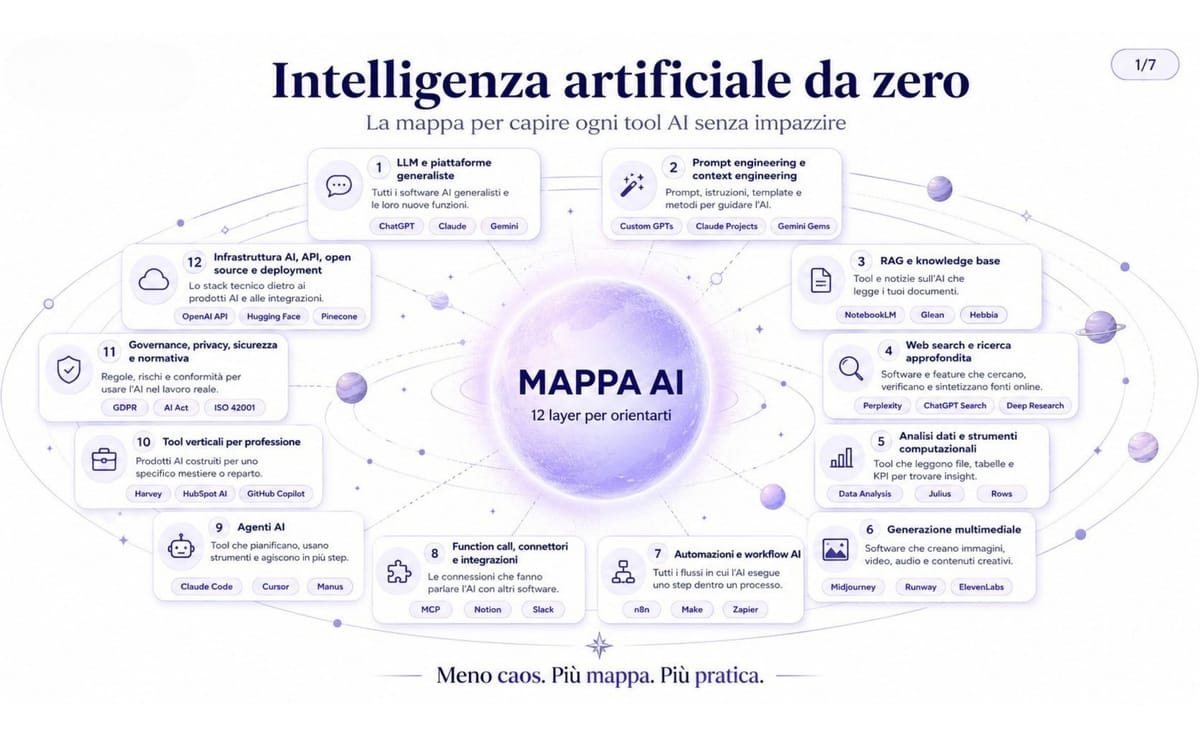
The entire AI ecosystem fits into twelve categories. You don't have to memorize them: it's enough to keep them in mind when something new shows up, so you can ask yourself «which bucket does this go in?».
- 1
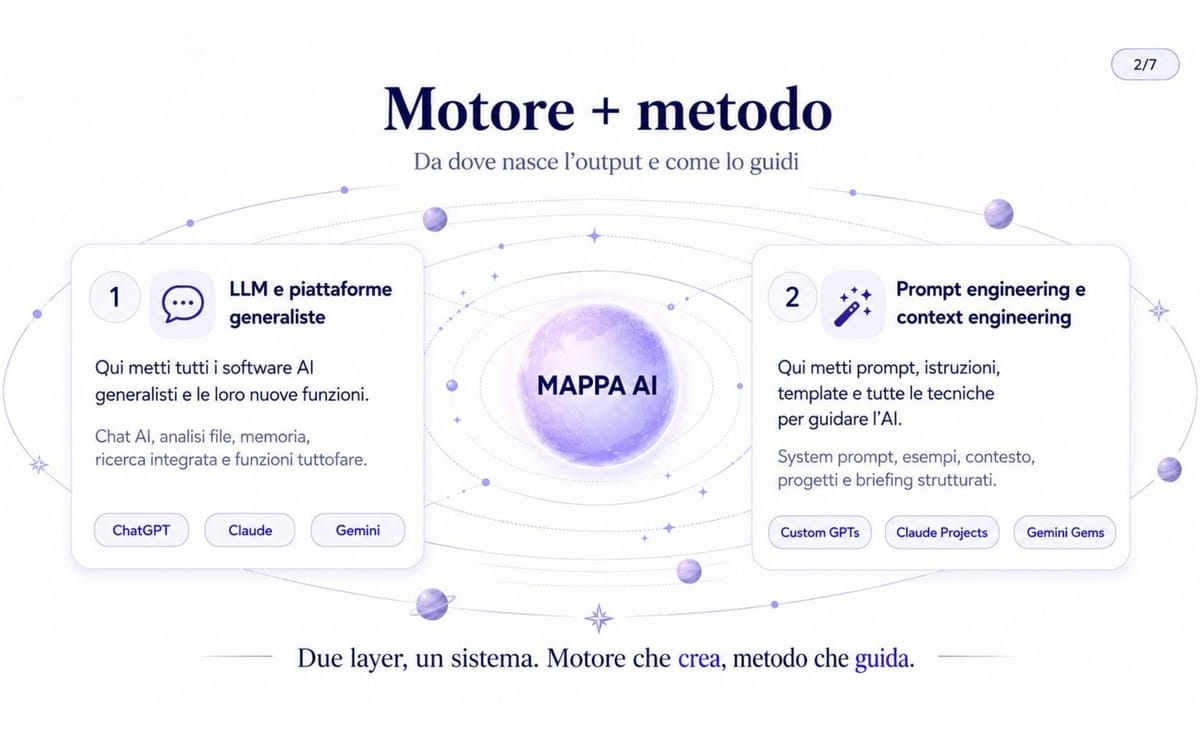
LLMs and general-purpose platforms
The base models (GPT, Claude, Gemini) and their chats. This is level zero: everything else builds on top of it.
- 2
Prompting, context engineering and method
How you phrase the request: custom instructions, system prompts, the way you structure context.
- 3
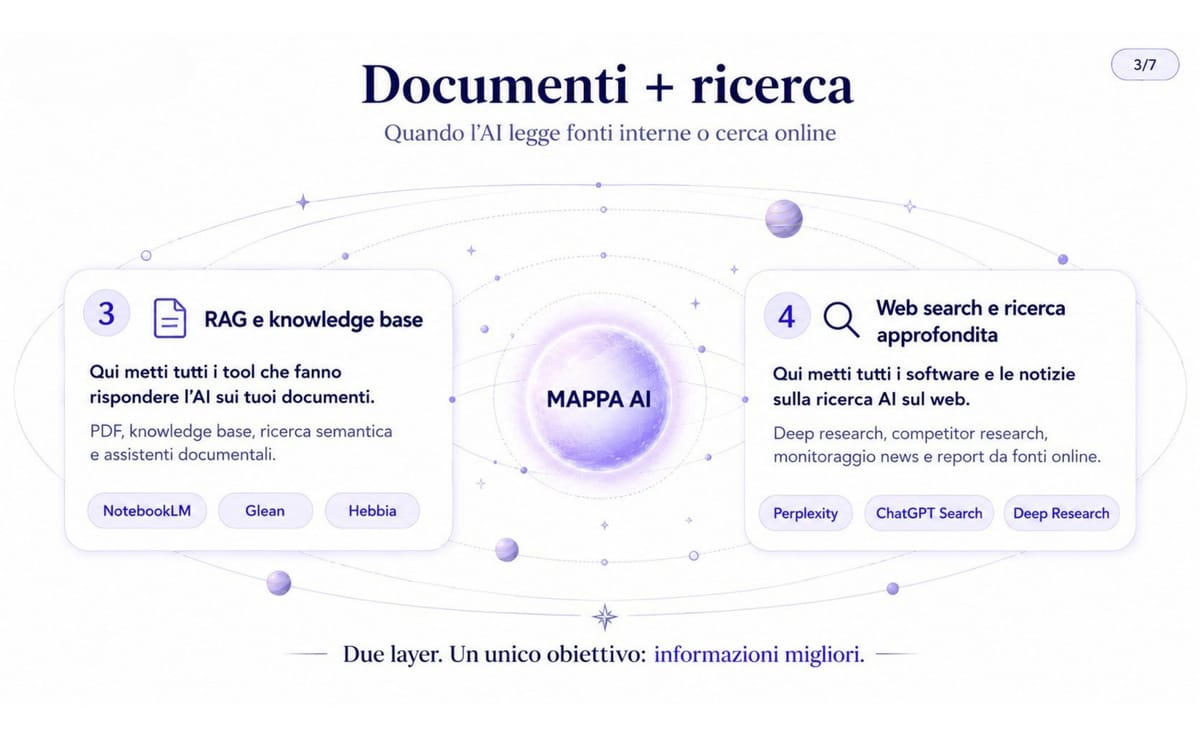
RAG and knowledge bases on your documents
The model answers by anchoring itself to your files. Fewer hallucinations, more answers grounded in the data you give it.
- 4
Web search and deep research
The AI searches online in real time and summarizes. Perplexity, deep research: fresh information, not just memory.
- 5
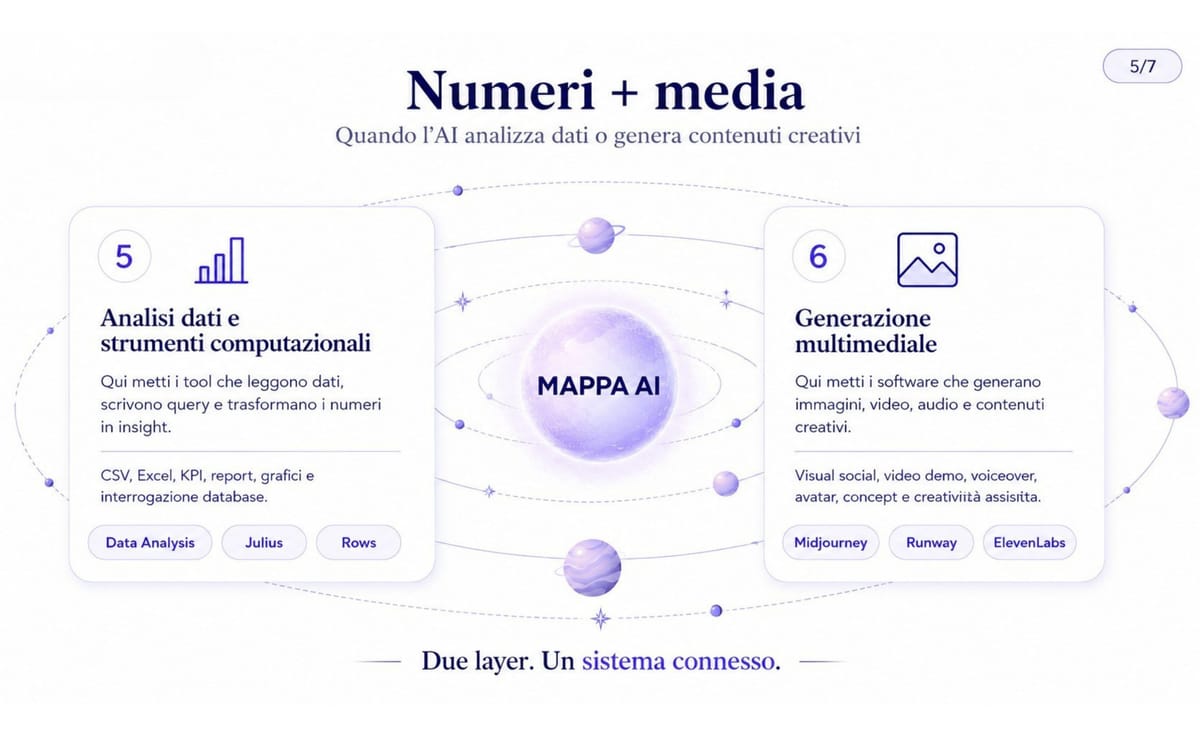
Data analysis and computational tools
You query data, generate SQL, analyze spreadsheets. Here the AI becomes an analyst, not a chatterbox.
- 6
Media generation: images, video, audio
Midjourney, Sora, Runway, ElevenLabs. Not text: visual and audio creation.
- 7
AI automations and workflows
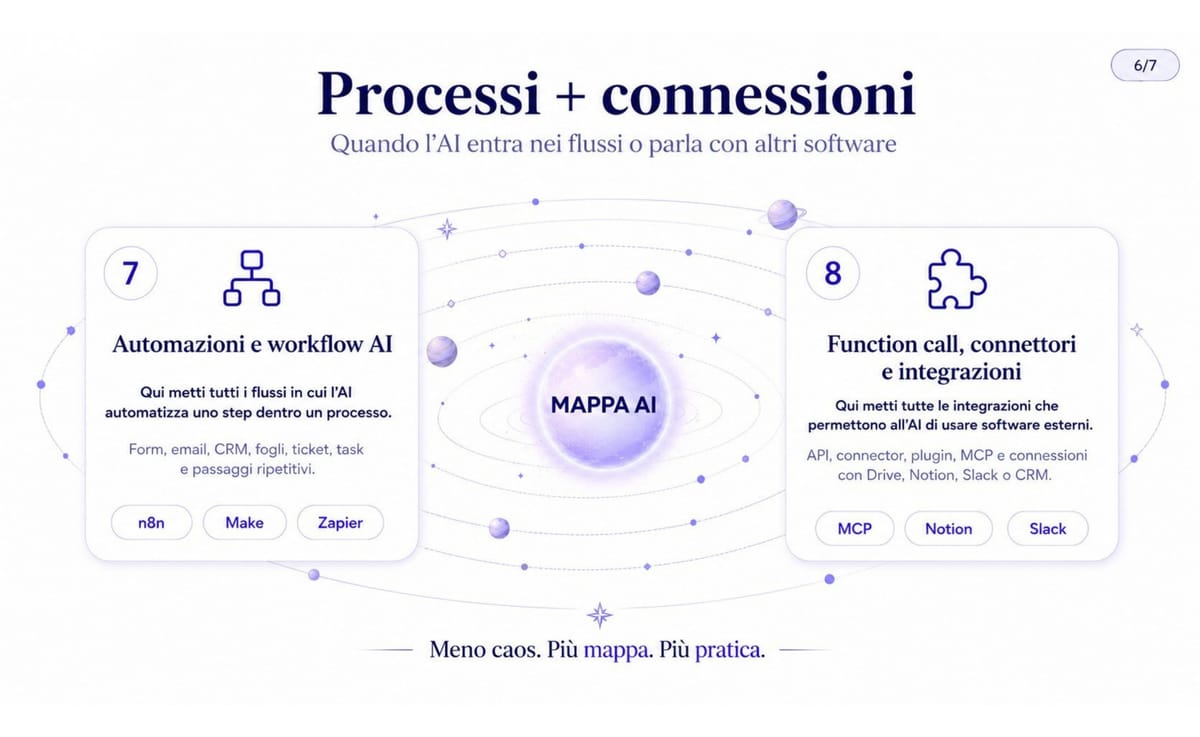
Make, Zapier, n8n: sequential processes where the AI interprets and hands off. Not autonomy yet.
- 8
Function calling, connectors and integrations
The technical bridges between the model and external software: APIs, standards like MCP. The model acts outside the chat.
- 9
AI agents
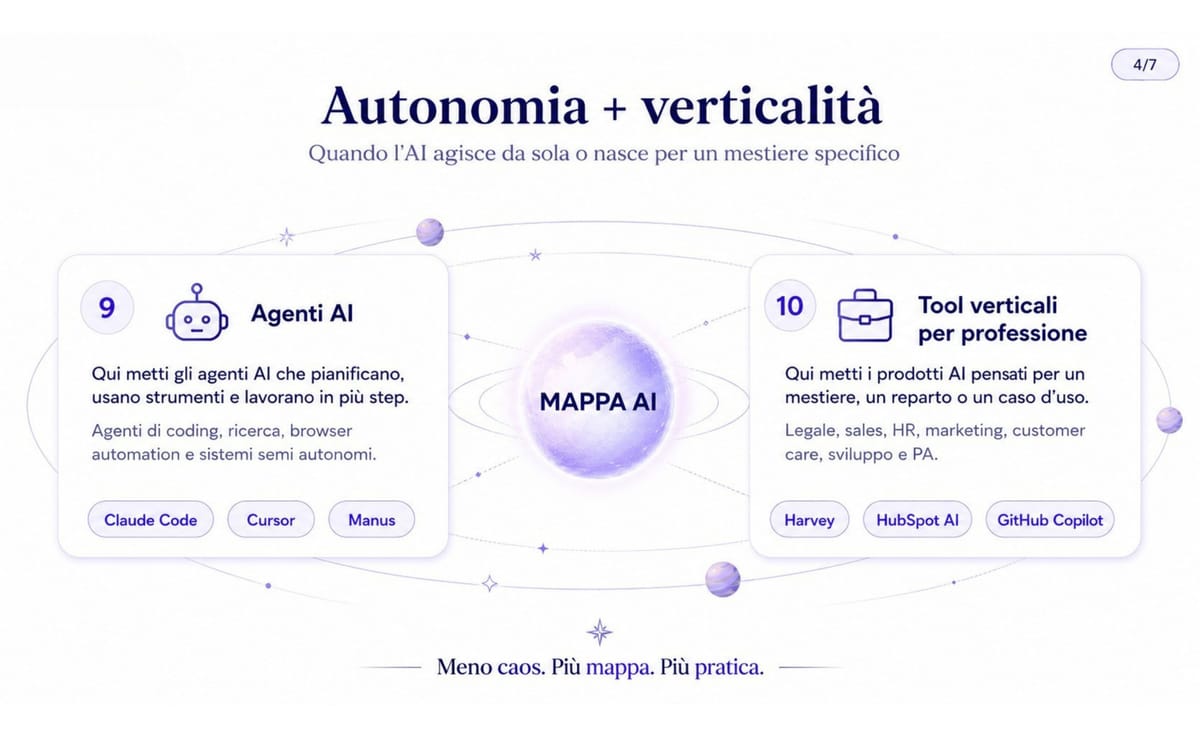
Systems that plan, choose their own tools and iterate on their own. Not a script: the ability to decide the steps.
- 10
Vertical tools by profession
Legal, HR, medical AI: applications built on top of the base technology for a specific profession.
- 11
Governance, privacy, security, ethics
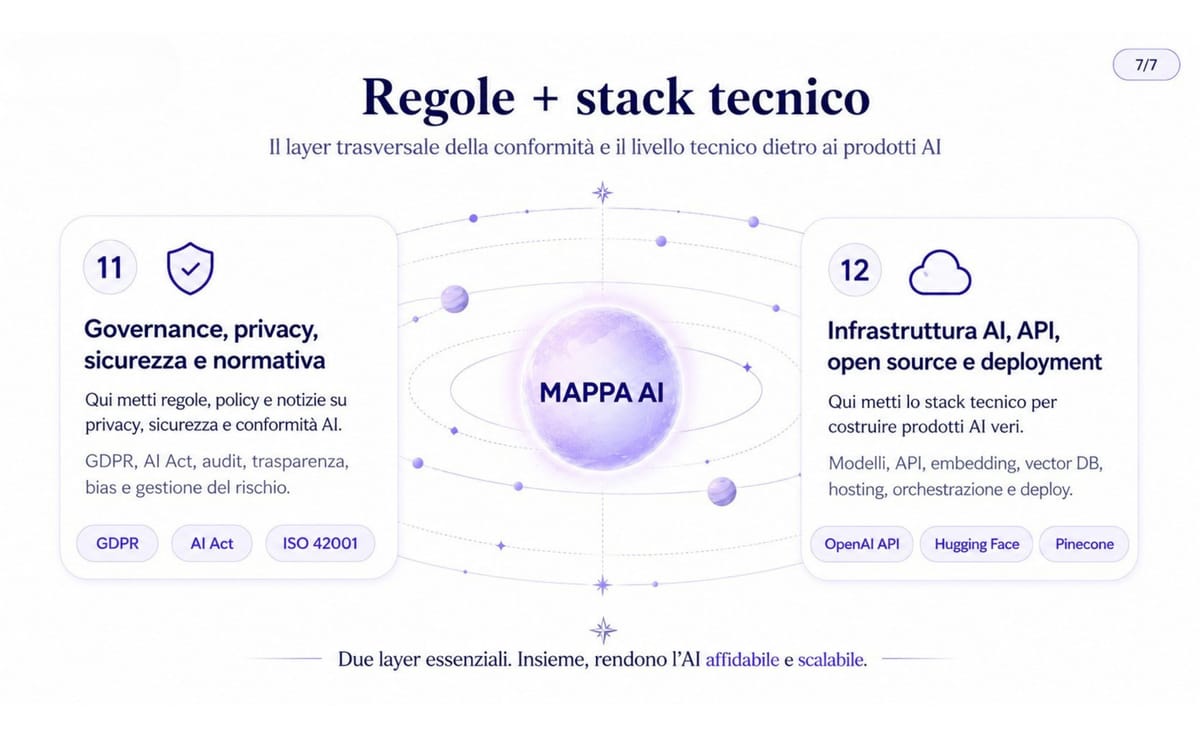
GDPR, AI Act, consent, transparency. The cross-cutting level: it runs through all the others, you can't skip it.
- 12
Infrastructure, APIs, open source, deployment
Vector databases, fine-tuning, self-hosting, GPUs. The technical layer underneath everything else.
Here's the map visualized: first the overview of the big levels, then the buckets shown in groups, so you can see how the tools you use every day are distributed.
The pyramid: how they fit together
The twelve buckets aren't all on the same level. They stack into a pyramid: each level rests on the one below. Understanding the order tells you right away «what's underneath» a tool.
- 1 Base: the raw capability of the LLMs. Everything starts here.
- 2 Intermediate levels: prompting, RAG, data analysis, automations — techniques that make the base useful.
- 3 Higher levels: vertical tools by profession and agents that decide the steps on their own.
- 4 Cross-cutting level: governance, privacy and ethics run through every layer, from start to finish.
With AI it's not that you no longer need to verify. You need to verify better: knowing which layer you're on tells you how much to trust it.
The 3 questions to ask about every new thing
When yet another AI news story shows up, don't let it sweep you along. Run it through three blunt questions: in a few seconds you'll know if it's relevant to you or just noise.
- 1
Which mental category does it go in?
Pick one of the 12 buckets. If you can't sort it in, it's usually marketing, not technology.
- 2
What's the underlying technology?
Strip away the packaging: is there an LLM underneath? A RAG? An automation? The flashy name almost always hides something already known.
- 3
Is it a genuine novelty or a new interface?
It's often the same technology with a new skin. Spotting that saves you wasted time and enthusiasm.
The «AI agent» trap
«AI agent» is the most overused label of the moment. Almost everything sold as an agent is, in reality, an automation with a chat in front of it. Convenient, but it's not the same thing.
A real agent plans, chooses its own tools to use and iterates until it reaches the result. An automation executes a sequence already decided by you. The difference is who decides the steps.
Keep this in mind every time you read «agent»: on the map, bucket 7 (automations) and bucket 9 (agents) are two different layers. Confusing them is the fastest way to mix up apples and oranges.
Build your own personal radar
The map becomes powerful when it stops living in your head and becomes a system. The idea: a Notion "AI Map" database where you log every tool with its bucket, priority and the path it serves. Then you let Claude (or ChatGPT, Gemini, Perplexity) do the classifying and browse it all by views: by priority, by profession, by bucket, "to test".
Copy this prompt, paste in an AI news item and let the model sort it for you:
I'll give you a piece of news or an AI tool. Help me sort it into my map.

News: [PASTE HERE the news / the link / the tool description]

Answer me tersely, like this:
1. Category (pick one of the 12): [LLM / prompt & method / RAG / web search /
   data analysis / media generation / automations / function calling &
   integrations / agents / vertical tools / governance / infrastructure]
2. Underlying technology: what's really under the marketing?
3. A genuine novelty or a new interface on something that already exists?
4. Do I need it? For which of my paths (builder / marketer / operator) and
   with what priority (test right away / keep an eye on / ignore)?
From here you're no longer just consuming content: you're building a radar. Every new thing finds its place, and you decide what deserves your time. Less chaos, more map, more practice.


