Claude Code Basics Lesson 3 of 46
How an Agent Works: The Loop

- An agent doesn't just answer and stop: it loops until the task is done.
- The loop is always the same: think → ask for a tool → look at how it went → decide the next move.
- The model has no hands: it asks, and the program on your computer executes.
- The loop ends when it stops asking for tools and just talks to you.
Let's watch it on an example
You have a folder full of this year's invoices. You open Claude Code there and ask for one single thing: «check whether there are any duplicate invoices».
From the outside it looks like a question. From the inside, here's what happens:
it looks at what's in the folder, because it doesn't know;
it opens a few files to understand what an invoice looks like;
it runs a command to compare all of them;
the command doesn't return what it hoped, so it changes tack and tries again;
in the end it writes to you: there are two identical ones, here they are.
The point isn't how skilled it is. The point is that you didn't ask for any of those steps. You gave the goal; it chose the steps itself, one at a time, checking each time how the previous one had gone.
The loop, in four moves
What you just read isn't a lucky break: it's always the same loop, repeated. Four moves:
Think. It looks at the goal and what it knows so far, and decides what the next useful move is.
Ask for a tool. Read a file, write one, run a command: it says which one it needs.
Look at how it went. The result comes back — even when it's an error.
Decide the next move. And it starts over from the top.
This loop has a name, and you'll hear it often: the agentic loop. That's really all there is to it, and it's the one thing that makes an agent an agent instead of a chatbot.
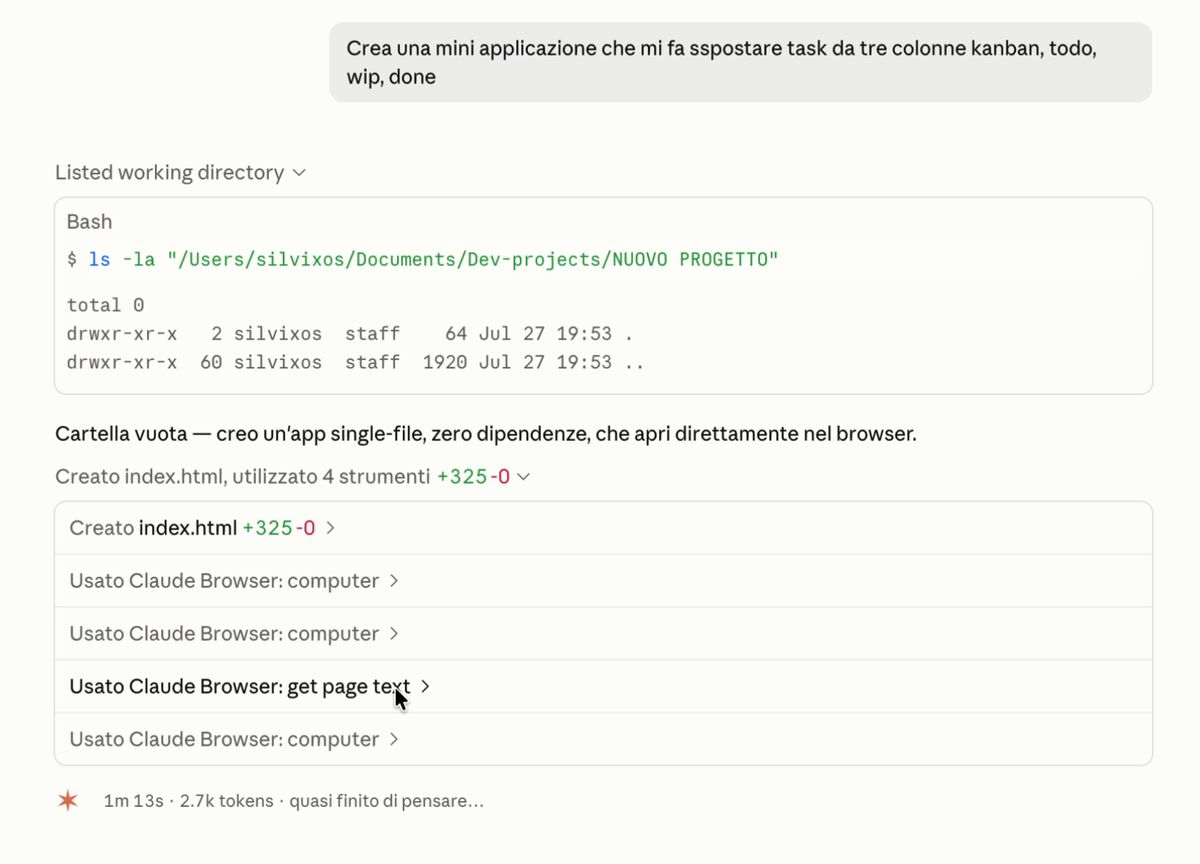
Who thinks and who executes
There's a detail that sounds technical but you'll need it for the rest of the course: the part that reasons isn't the part that executes.
The model — the "intelligent" part — can't touch anything on your computer. It doesn't open files, doesn't run commands, doesn't see your folder. All it can do is ask: «I need to read this file». It's the program running on your machine that executes the request and reports the result back to it.
It sounds like a technicality, but it's the reason why later on you'll be able to decide what it can and can't do: every request passes through a point where someone can say no. And that someone is you.
How you know it's done
As long as the model asks for tools, the loop keeps going: you watch its moves scroll by one after another. But when it replies without asking for anything, the loop closes.
That's why a session always ends with a written message: that message isn't the answer to your question, it's the signal that, as far as it's concerned, the work is done. If it looks done badly to you, that's where you pick it back up.
What's next
I've told you about the loop now. In the next lesson we actually watch it run: we open Claude Code, ask it for a small dashboard, and I point out every piece we talked about here as it scrolls by.
Did you get it?
Two minutes, no grade. Trying to answer — even getting it wrong — cements the concepts far more than rereading. Not in the mood? Skip it: the lesson still counts as complete.
What sets an agent apart from a chat?
Answer length has nothing to do with it. An agent doesn't produce an answer: it takes steps, looks at the outcome of each one, and decides the next step, repeating until the task is closed. A chat does one turn and stops.
Who actually opens and edits your files?
The model reasons but has no hands: it can't touch anything by itself. It says «I need to read this file» and the program running on your machine executes it and reports the result back. This separation is exactly what leaves you in control — that's where permissions slot in.
How do you know the loop is done?
The loop keeps going as long as the model asks for tools. The moment it just replies, without asking for another one, it's saying «I'm done»: that's the end signal, and it's exactly the message you read at the end.
 Course Claude Code Basics
 -
Chapter 1 Introduction
-
Chapter 2 What's Underneath
-
Chapter 3 You Choose the Engine
-
Chapter 4 First Time at the Controls
-
Chapter 5 What You Let It Touch
-
Chapter 6 What It Knows About You
-
Chapter 7 Skills
-
Chapter 8 How Many You Put to Work
-
Chapter 9 What It's Connected To
-
Chapter 10 Automating the Setup
-
Chapter 11 Wrap-Up