Claude Code Basics Lesson 19 of 46
Why It Asks for Permission

- It doesn't ask permission for everything: looking goes through, touching stops.
- What stops is the tool, not the model: the request gets intercepted before it's executed.
- Saying no is normal: that move is skipped and it looks for another way.
- This is the point in the loop where you have a say. The whole chapter is about tuning it.
Where that question comes from
In the last lesson you saw Claude Code stop and ask if it could proceed. Now you have everything you need to understand exactly what happened, because we already took it apart: the model asks for a tool, the tool executes it.
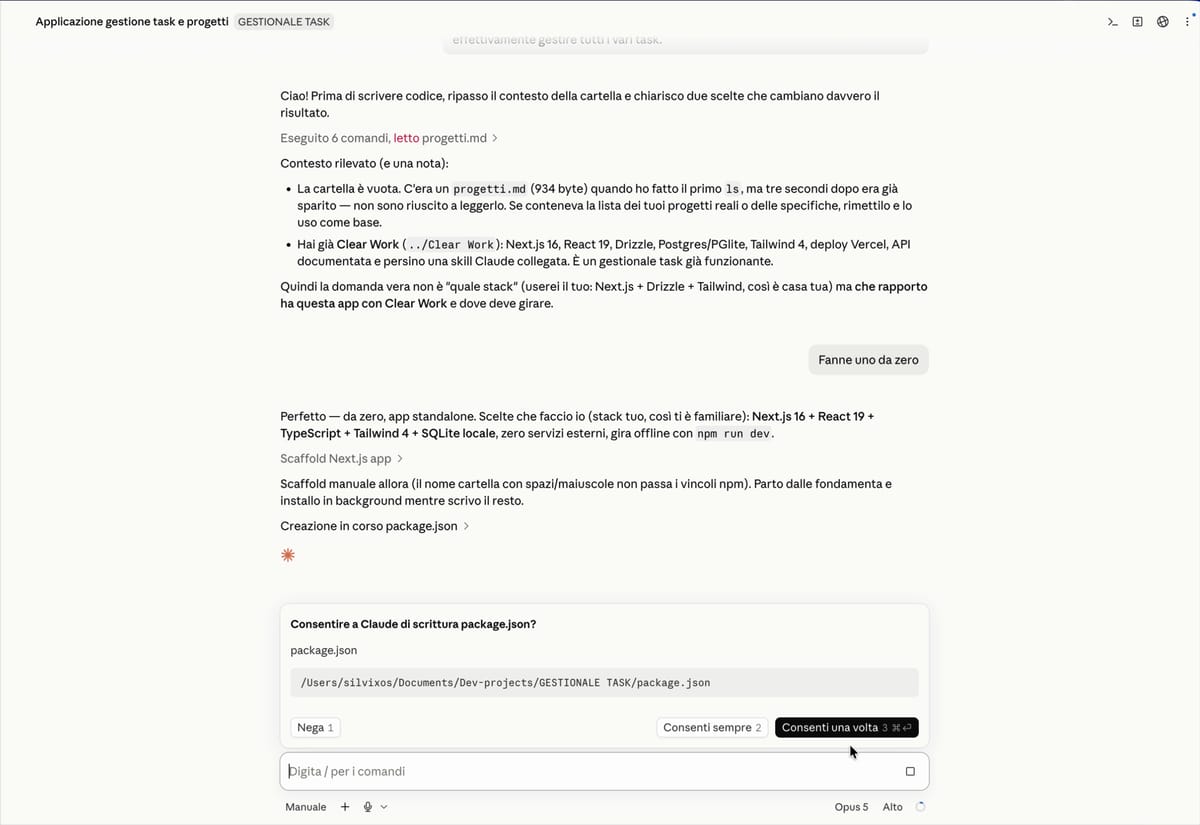
The permission request lives right there in the middle. The model said "I need to modify this file"; before actually doing it, the tool stepped in between and turned the question over to you.
It's a difference that matters more than it looks: you're not hoping the model is being careful. The control is mechanical, it lives in the tooling, and no amount of reasoning can get around it.
What passes without asking, and what doesn't
If it asked for confirmation on every single move, you'd be a traffic light, not someone getting work done. In fact it doesn't: the line is drawn on possible harm.
Looking passes. Reading the files in the folder it's working in, searching inside them, getting a sense of things: it asks nothing, because looking changes nothing.
Modifying stops. Writing, rewriting, deleting: here it always asks, because it's your stuff that's changing.
Running commands stops. With one exception: a small group of commands that only read pass without interruption.
There's a single rule behind it, and it's the one you'd use with a new collaborator: look as much as you want, ask before you touch.
What happens if you say no
Most people stiffen up at the first no, as if they'd broken something. Nothing bad happens: that move doesn't get executed, and Claude ends up with a failure in hand — which, as you know from the lesson on the loop, is information like any other.
From there it looks for another way, or asks how you'd prefer to proceed. No is part of the conversation, not an emergency button.
In the desktop app, by default, no is even more comfortable: it proposes the changes by showing you before and after, and until you accept, the file hasn't been touched.
And now
That's fine for the first few times. But after half an hour of saying yes to the exact same thing, playing traffic light gets tiring — and when someone gets tired, they accept everything without reading, which is the real danger.
In the next lesson you'll learn to give the answer once: always yes to this, ask me for that, never for that other one.
Did you get it?
Two minutes, no grade. Trying to answer — even getting it wrong — cements the concepts far more than rereading. Not in the mood? Skip it: the lesson still counts as complete.
Why doesn't it ask you anything to read a file, while it stops to modify one?
The criterion is possible harm, not effort. Looking inside a folder changes nothing; rewriting a file does. The tool stops exactly where the action leaves a mark.
If you say no to a permission request, what happens?
A no is a normal answer inside the loop, not an incident. The move is skipped, the negative result comes back and becomes the information it uses to choose the next step — exactly like a failed command.
Who stops in front of a sensitive action: the model or the tool?
This is the point of lesson 3: the model asks, the tool executes. The question reaches you because the tool stepped in between — and that's what actually gives you control, instead of having to hope the model is being careful.
 Course Claude Code Basics
 -
Chapter 1 Introduction
-
Chapter 2 What's Underneath
-
Chapter 3 You Choose the Engine
-
Chapter 4 First Time at the Controls
-
Chapter 5 What You Let It Touch
-
Chapter 6 What It Knows About You
-
Chapter 7 Skills
-
Chapter 8 How Many You Put to Work
-
Chapter 9 What It's Connected To
-
Chapter 10 Automating the Setup
-
Chapter 11 Wrap-Up