Claude Code Basics Lesson 16 of 46
The Folder: Where You Open It Decides What It Works On

- Claude Code works inside the folder you open it in. That folder is its studio.
- Opening it in the wrong place is day-one mistake number one.
- For your first time: a small, new folder with just the experiment in it.
- Huge folder = slower, pricier, more things it can touch by accident.
The folder is the studio
Think back to the collaborator. When they walk in, they walk into one specific room: the one you let them into. What's in that room, they can see and work on; what's in other rooms doesn't exist for them.
With Claude Code it works the same way: the folder you open it in is its workspace. That's where it looks around to understand what's going on, and that's where it gets to work.
It's not some hidden setting you tweak: opening it there is the gesture itself.
In the desktop app — open the Code tab, choose Local (meaning: work on my computer, on my files), then the folder icon right next to it. The Mac's folder picker opens: whatever you choose there is the studio.
From the terminal — it's the folder you're in the moment you type
claude. No picker screen: it's just wherever you are.
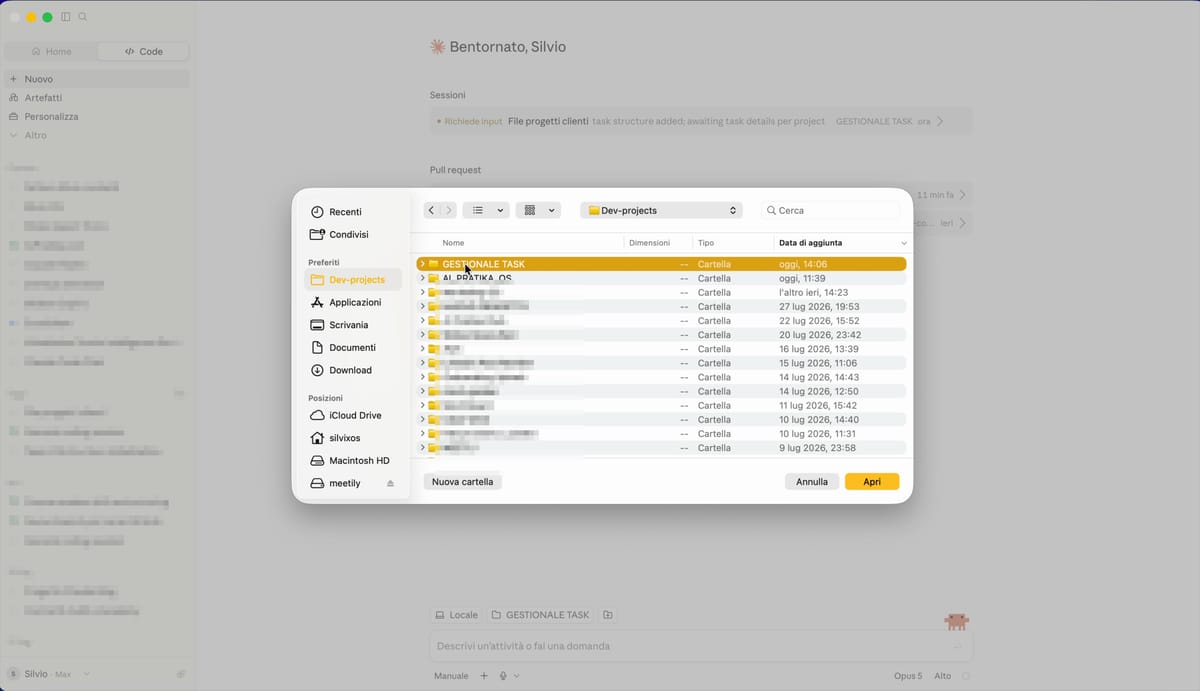
The classic first-day mistake
The temptation is: "I'll just open my whole Documents folder, so it has all the context and understands better." That's the opposite of what you need, for three reasons:
It takes longer. Before it can work, it looks around. In a massive folder, looking around becomes a job in itself.
It costs more. Every lap it spends exploring is work you pay for — it's the same arithmetic as the lesson on your bill.
It's riskier. The more it has within reach, the more it can touch by accident. We'll see how to set boundaries in the permissions lesson, but the first boundary is not letting it in where it doesn't need to be.
How to get it right
For your first experiment: create a new folder, drop two or three test files in it, and open Claude Code there. If something goes wrong, all you've lost is a test folder.
For real work: open it on the folder for that work, not on the container above it.
If you realize you're in the wrong place, don't push through: close it and reopen it in the right folder. It costs you ten seconds.
What's next
Now you know where to open it. Before you give it your first task, let's settle a debt from the last chapter: you know which engine to pick, but you've never actually seen how to switch it. That's the next lesson, and it's a single gesture.
Did you get it?
Two minutes, no grade. Trying to answer — even getting it wrong — cements the concepts far more than rereading. Not in the mood? Skip it: the lesson still counts as complete.
What determines the folder Claude Code opens in?
The folder is the studio you let it into: it's what it explores to understand the context, and it's where it works. Opening it in the wrong place is day-one mistake number one.
It's your first time. Where do you open it?
The more stuff there is, the more time it wastes looking around, the more it burns through, and the more it can touch by accident. A small folder keeps your first experiment fast, cheap, and risk-free.
Why does a huge folder cost more?
Every lap it spends looking around is work you pay for, and in a huge folder the laps pile up. It's the same reason a long session costs more than a short one: there's more to go back over.
 Course Claude Code Basics
 -
Chapter 1 Introduction
-
Chapter 2 What's Underneath
-
Chapter 3 You Choose the Engine
-
Chapter 4 First Time at the Controls
-
Chapter 5 What You Let It Touch
-
Chapter 6 What It Knows About You
-
Chapter 7 Skills
-
Chapter 8 How Many You Put to Work
-
Chapter 9 What It's Connected To
-
Chapter 10 Automating the Setup
-
Chapter 11 Wrap-Up